Disabling all WordPress plugins
It is possible for a WordPress website to stop working correctly after a new plugin is installed, or an existing plugin is updated. If the WordPress Dashboard remains active, you can temporarily disable or remove the problematic plugin; however, some plugins also cause the WordPress Dashboard to stop working. In such cases, you can easily disable all plugins on your WordPress website via the hosting Control Panel's WordPress Manager by following these steps:
- Find the WordPress installation in the list inside the WordPress Manager, and click on the Manage button for it.
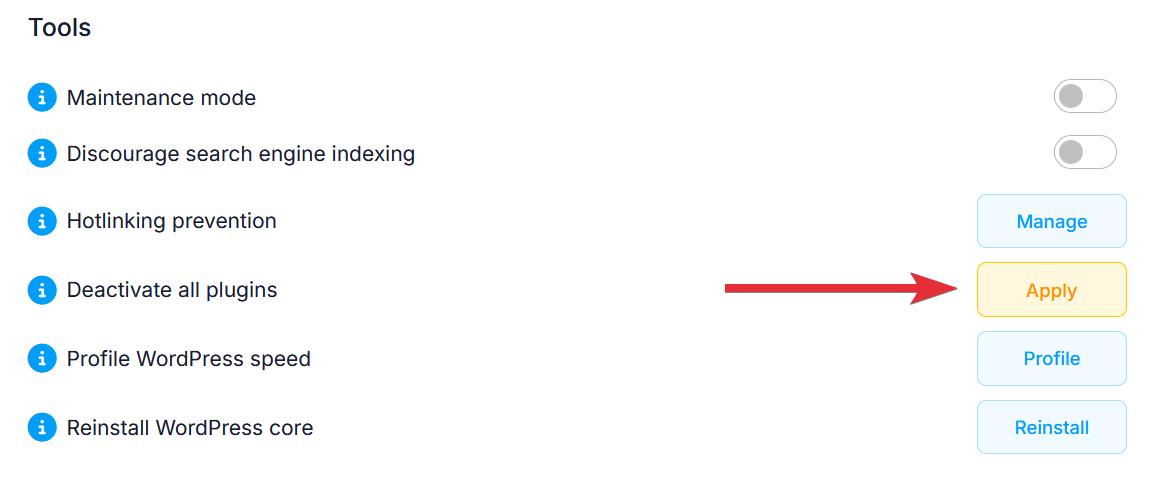
- Under the Tools subsection, click on the Apply button next to Deactivate all plugins.
This should allow you to log in your WordPress Dashboard, and resolve the problem with the misbehaving plugin. You can find step-by-step instructions on how to re-activate your plugins through the WordPress Dashboard in our Managing WordPress plugins article.